Schedule Your Free Demo

See how Shilte AI can automate your enterprise operations.

AI Knowledge Hub | Teach Your AI Everything About Your Business — Shilte AI
Shilte AI Knowledge Hub

Give your AI agents the knowledge to know your business.

Upload PDFs, website URLs, product catalogues, images and business documents. Shilte AI organizes your information so your agents can answer customer questions with relevant, business-specific knowledge.

One organized knowledge source for your AI agents.
African and international business team collaborating around a table
Business catalogue.pdf Document added to knowledge
Organizing information...
Business Knowledge
Company information
Product catalogue
Website content
FAQs and policies
Illustrative interface
Business-specific AI knowledge

Bring your business knowledge together
Documents
Website pages
Product catalogues
Product images
FAQs
Your business, understood

Everything your AI needs to know, in one place.

Your business information may be spread across PDFs, websites, spreadsheets and product photos. Bring it together so your AI agents have useful information to work with when customers ask questions.

01 · Documents

Upload PDFs & files

Add company profiles, brochures, price lists, menus, service guides, policies and other business documents.

02 · Websites

Learn from your website

Provide website URLs so your knowledge hub can use available business pages, service information and published content.

03 · Catalogues

Add products & services

Organize product names, descriptions, prices, specifications, service details and other customer-facing information.

04 · Visual knowledge

Upload product images

Attach relevant product photos to product information so agents can share available visuals with customers.

African business professionals reviewing business information and documents
Team working together on a digital business project
Your business knowledge, organized
From information to answers

Stop making customers search through your business information.

Instead of asking customers to read multiple pages, download documents or wait for someone to respond, let your AI agents use your available business knowledge to help answer their questions.

  • Answer product questions. Help customers understand features, sizes, specifications and available options.
  • Explain services and pricing. Give customers information based on your supplied service descriptions and price lists.
  • Share available product photos. Use linked product images where they are available and relevant to the conversation.
  • Provide consistent information. Give your website and WhatsApp agents access to the same configured knowledge sources.
Set Up Your Knowledge Hub
See the difference

What happens when your AI knows your business?

Choose a customer question and see an illustrative example of how an AI agent can use business-specific knowledge to respond.

Shilte AI Business Assistant Example knowledge-based conversation
Illustrative customer conversation
Do you have this coffee machine, and what can it do?
Yes! Our example catalogue includes a 15-bar espresso coffee machine. It features a milk frother, a removable water tank and a compact design for home use.
Example source: Product catalogue
Simple setup

Build your business knowledge in four steps.

You don't need to build an AI model or write complicated instructions. Start with the information your business already has.

Gather your information

Collect your brochures, product lists, FAQs, website links, policies and other useful business material.

Upload and organize

Add your information to the Knowledge Hub and arrange it into relevant business topics and categories.

Prepare your AI

Process supported sources so your agents can retrieve relevant information when responding to customers.

Put knowledge to work

Use the configured knowledge with your Shilte AI agents across supported customer channels.

Visual product knowledge

Let customers see what they're asking about.

Product knowledge should go beyond text. Add product photos and descriptions together so your AI agent can provide more useful product information and share relevant available images.

Example product catalogue Illustrative
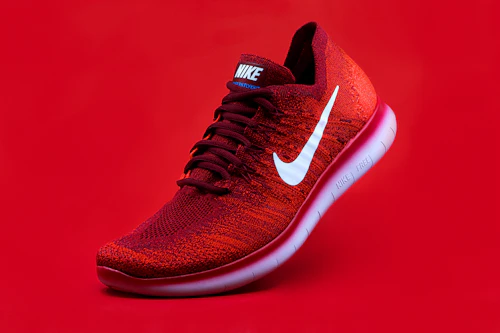
Red sports shoe product
Running ShoesProduct image + details
Wristwatch product
Classic WatchProduct image + details
Beauty and skincare product model
Beauty CollectionProduct image + details

Give your product catalogue more context.

When you add a product image alongside its description and details, your business assistant has more useful context for product enquiries.

Attach product images to the relevant product information.
Include descriptions, features, prices and specifications.
Help your AI respond with relevant information and available visuals.

Actual image sharing depends on the product image being uploaded, linked correctly and supported by the selected channel.

Knowledge that supports your agents

One knowledge foundation. Multiple customer touchpoints.

Your business shouldn't have to maintain separate answers for every channel. Configure your knowledge once and make it available to the Shilte AI agents that are set up to use it.

  • Website AI widget. Help website visitors find answers while browsing your business.
  • WhatsApp AI assistant. Respond to customer enquiries through your connected WhatsApp channel.
  • Business support. Give your configured agents information for products, services and common customer questions.
  • Human support when needed. Allow conversations to be escalated to your team where your workflows support handoff.
Start Using Shilte AI
African woman business professional working at a laptop
Diverse colleagues collaborating in a modern office
Connected AI experiences
Built with control in mind

Your business knowledge stays yours to manage.

Good AI starts with useful information. Keep your content organized, review what you upload and maintain the information your agents rely on.

Organized knowledge

Keep documents, products, website information and frequently asked questions arranged in meaningful groups.

Update your information

When your prices, products or policies change, update the relevant knowledge sources and process them as required.

Business-level control

Manage knowledge within your business workspace and follow your account's access and data-management settings.

Frequently asked questions

Questions about the Knowledge Hub?

Here are a few things to know before setting up your business knowledge.

You can add supported business documents such as PDFs, website URLs, product catalogues, product images, service information, company profiles and FAQs. Available formats and upload limits depend on the tools enabled in your workspace.

You can provide website URLs as knowledge sources. The pages must be accessible to the configured processing system. Login-protected pages, blocked content and unsupported page elements may not be available for extraction.

Yes, where product images have been uploaded and linked to the relevant product information and the selected channel supports image messages. The agent can then use available visuals in relevant customer conversations.

No advanced AI or programming knowledge is required to prepare your business information. You should, however, review your uploaded content and organize it clearly so your agents can use it effectively.

Updated information needs to be processed and made available to the relevant knowledge source before your agents can use it. The exact update process depends on the source type and workspace workflow.

Your configured Shilte AI agents can use shared business knowledge across supported channels, including your connected WhatsApp assistant and website widget.

Make your business easier to understand

Give your AI agents the knowledge to serve your customers better.

Bring your documents, products, website information and business expertise together with Shilte AI.

Get Started with Shilte AI